How to Print 4 Bingo Cards Per Page and Save Paper
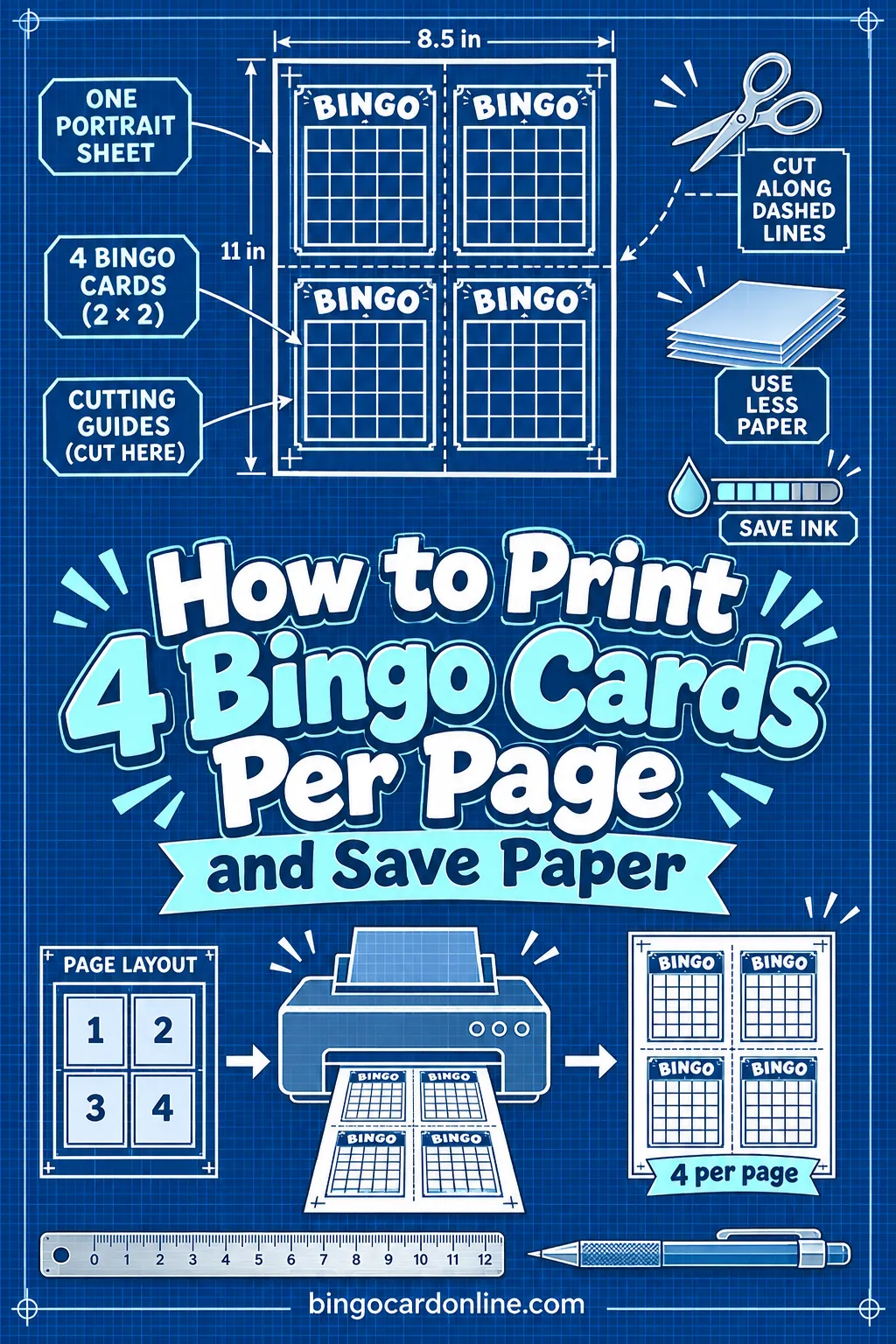
To print multiple bingo cards per page, set "Cards per page" to 4 in the free generator, print the sheet, and cut it into quarters, so 30 players need only 8 sheets of paper instead of 30. Switch on the black-and-white ink-saver theme too, and you'll cut your ink use along with your paper. The whole job takes a few minutes with the free bingo card generator.
Below you'll find the exact settings, a paper-count table, cutting tips, and when smaller cards are the right call (and when they aren't).
Why Full-Page Bingo Cards Waste So Much
A standard bingo card doesn't need a whole sheet of paper. Most players only need a grid big enough to read and mark. When you print one card per page, most of the sheet ends up as margin.
Here's what that looks like for a typical class or party of 30:
- One card per page: 30 sheets, 30 full grids of ink, and a stack that's bulky to hand out.
- Four cards per page: 8 sheets (7.5 rounded up), the same 30 unique cards, and far less ink.
If you run bingo often, say weekly in a classroom or monthly at a senior center, that difference adds up fast. A smaller card is also easier to slide into a folder, a goodie bag, or a coat pocket.
The ink problem
Paper is only half of it. Colorful themes look great, but each card prints a colored header and tinted squares. Four cards per page cuts the number of sheets, and the ink-saver theme drops the color fills. Together they make a big batch much cheaper on your printer.
How to Fix It With the Generator
Here's the step-by-step setup. It works the same for word cards, number cards, emoji cards or photo cards.
- Open the bingo card generator on a computer connected to your printer.
- Pick your card type. Choose Words, Numbers (1–75 B-I-N-G-O or 1–90 UK style), Emoji, Photos, or Blank.
- Choose the grid. For four to a page, a 3×3 or 4×4 grid stays easiest to read. A 5×5 grid works too, as long as your words are short.
- Add your words. Use "Quick start with a theme," or type your own list, one word per line.
- Set the number of unique cards. Enter one per player, plus a few spares. Every card is a different shuffle.
- Set "Cards per page" to 4. This puts four cards on each sheet in a 2×2 layout.
- Pick a color theme. Choose ink-saver black & white if you want to save ink.
- Click "Print / Save as PDF." Print right away, or save the PDF and print it later.
That's it. Print the sheets, then cut each one into quarters along the middle lines.
Two cards per page as a middle ground
If four feels too small for your group, set "Cards per page" to 2 instead. You get half-page bingo cards that are still big and roomy, and 30 players need 15 sheets. That's a good fit for younger kids, older players, or anyone who'll use chunky markers.
Paper count by cards per page
Use this table to plan your print run before you hit print. Sheets are rounded up, since a half-used sheet still comes out of the tray.
| Players | 1 per page | 2 per page | 4 per page |
|---|---|---|---|
| 10 | 10 sheets | 5 sheets | 3 sheets |
| 20 | 20 sheets | 10 sheets | 5 sheets |
| 30 | 30 sheets | 15 sheets | 8 sheets |
| 50 | 50 sheets | 25 sheets | 13 sheets |
| 100 | 100 sheets | 50 sheets | 25 sheets |
A tip for odd numbers: if you need 30 cards, set the generator to 32. That fills the last sheet, and you'll have two spares for latecomers or a card that gets torn.
Choosing the Right Grid for Small Cards
Small cards change which grid works best. A quarter of a letter-size sheet is about 4¼ by 5½ inches, so each square gets smaller as the grid gets bigger.
| Grid | Squares to fill | Words you need | How it reads at 4 per page |
|---|---|---|---|
| 3×3 | 9 | At least 9, ideally 15–20 | Big, easy squares; great for kids |
| 4×4 | 16 | At least 16, ideally 24–30 | Comfortable for most players |
| 5×5 | 24 + free space | At least 24, ideally 35–50 | Fine with short words or numbers |
Remember the basic bingo math. You need at least as many words as squares. If you give the generator more words than squares, each card gets a different mix, so fewer cards look alike and fewer players hit bingo on the same call. The site's "How many words do you need?" guidance shows the numbers right next to the word box.
For more on picking a card layout, see the guide to bingo card sizes: 3×3 vs 4×4 vs 5×5.
Keep words short on small cards
Long phrases shrink to fit, and tiny text is hard to read across a table. On four-per-page cards, aim for one to three words per square. "Long line" reads better than "waiting in a very long line." Number cards are the easiest of all, because a number fits any square.
How to Cut Four-Per-Page Cards Quickly
Cutting is where people lose time. A little setup makes it fast.
- Stack and cut. Stack four or five sheets, line up the edges, and cut through the whole stack at once. A paper cutter does this best; sharp scissors work for small stacks.
- Cut the long middle first. Cut each stack in half across the middle, then cut each half in half again. Two cuts per stack, and you're done.
- Fold and tear for kids. If you don't have a cutter, fold each sheet in half, crease it hard, and tear along the fold. It's not perfect, but it's fine for a quick game.
- Leave the stack sorted. Since each card is unique, nobody needs a particular one. Just hand them out from the top.
If you've never printed bingo cards at home before, the walk-through on how to print bingo cards at home covers printer settings like scale and paper size.
Paper and Markers for Small Cards
Small cards hold up differently than big ones. Pick paper based on how you'll use them.
Plain printer paper
This is the cheapest choice and fine for one-time games. Players can mark with a pen, a crayon, or a stamp. Plain paper does curl a little, so tape it down or use markers that won't slide.
Card stock
Heavier paper makes small cards feel like real game pieces. They lie flat and survive a few rounds of chips or beans. If your printer handles card stock, it's worth it for reusable sets.
Sheet protectors and dry-erase
For cards you'll reuse, slide each one into a small sheet protector or laminate it. Players mark with a dry-erase marker and wipe it clean between games. This saves paper over many sessions.
Party favors
Four-per-page cards make nice take-home bingo party favor cards. Print them on colored card stock with a fun color theme, add a card title like a birthday name, and tuck one into each goodie bag.
Markers that fit small squares
Smaller squares need smaller markers. Big bingo daubers can cover two squares at once on a 5×5 quarter-page card.
Good options for small cards:
- Pencils, pens or crayons for one-time paper cards
- Dry-erase markers on protected cards
- Small buttons, dried beans, or cereal pieces
- Printed chips from the generator's "Print bingo markers/chips" button, cut to size
The generator's chip sheets are handy because they match your card theme. For more ideas, see the guide to bingo markers.
When Smaller Cards Aren't the Best Choice
Four to a page isn't right for every group. Go with two per page, or one per page, when:
- Players have low vision. Bigger squares and bigger text help older players and anyone who struggles with small print.
- Young kids are marking. Little hands and fat crayons need room. A 3×3 card at two per page is a good fit.
- You're projecting or hanging cards. A wall display or a caller's board should be full size.
- You're using photos. Photo squares lose detail when they get small. Try two per page with a 3×3 or 4×4 grid.
If you're running a big event and need to balance size against paper, the tips in bingo for large groups can help you plan.
Other Ways to Save Paper
Four per page is the biggest saving, but a few other habits help too.
Print only what you need. Count players and add two or three spares. There's no need to print 50 cards for a group of 20.
Use the shareable link. The "Copy shareable link" button lets people play on their phones. If half your group has a phone handy, you only need to print cards for the rest.
Print the master call sheet once. The caller needs one copy of the "Print master call sheet" list to track what's been called. You don't need one per table.
Reuse with markers. Paper cards marked with chips or beans can be collected and played again next time.
Save as PDF first. Check the layout on screen before you print. Catching a typo now saves a whole batch of reprints.
Keep a master file. Saving the PDF also means you can reprint the exact same set next time. That's handy for a weekly class game or a club that meets every month, since you won't need to set everything up again.
Print a test sheet. Before a big batch, print one page and check that the cut lines and text look right. One extra sheet is better than 25 wasted ones.
Frequently Asked Questions
How many bingo cards fit on one page?
With the free generator, you can print 1, 2 or 4 cards per page. Four per page is the most paper-friendly option, and it fits 3×3, 4×4 and 5×5 grids. Each card ends up about a quarter of a letter-size sheet.
Are 4-per-page bingo cards too small to play?
For most players, no. A 3×3 or 4×4 card reads easily at that size, and a 5×5 card works with short words or numbers. For young kids or players with low vision, two per page is a better choice.
Will every card on the page be different?
Yes. The generator makes each card a different shuffle, so all four cards on a sheet are unique, and so is every card in the batch. Give it more words than squares and each card gets a different mix of words too.
How do I save ink when printing bingo cards?
Pick the ink-saver black & white theme before you print. It drops the color fills and prints clean outlines. Combine it with four cards per page and you'll use a fraction of the ink a full-color, one-per-page batch would use.
Can I print half page bingo cards instead?
Yes. Set "Cards per page" to 2 and each card fills half the sheet. Half-page cards are a nice middle ground when four per page feels too small but a full page feels wasteful.
What paper should I use for small bingo cards?
Plain printer paper is fine for one-time games. Card stock is better if you'll use chips or beans, or want to reuse the cards. For many games, put cards in sheet protectors and mark them with dry-erase markers.
Ready to Print Your Cards?
Four cards per page, the ink-saver theme, and a quick stack-and-cut turn a 30-sheet print job into 8 sheets. Set up your words, choose your grid, and print your batch with the free bingo card generator.