How to Make a Bingo Card (Free & Easy)
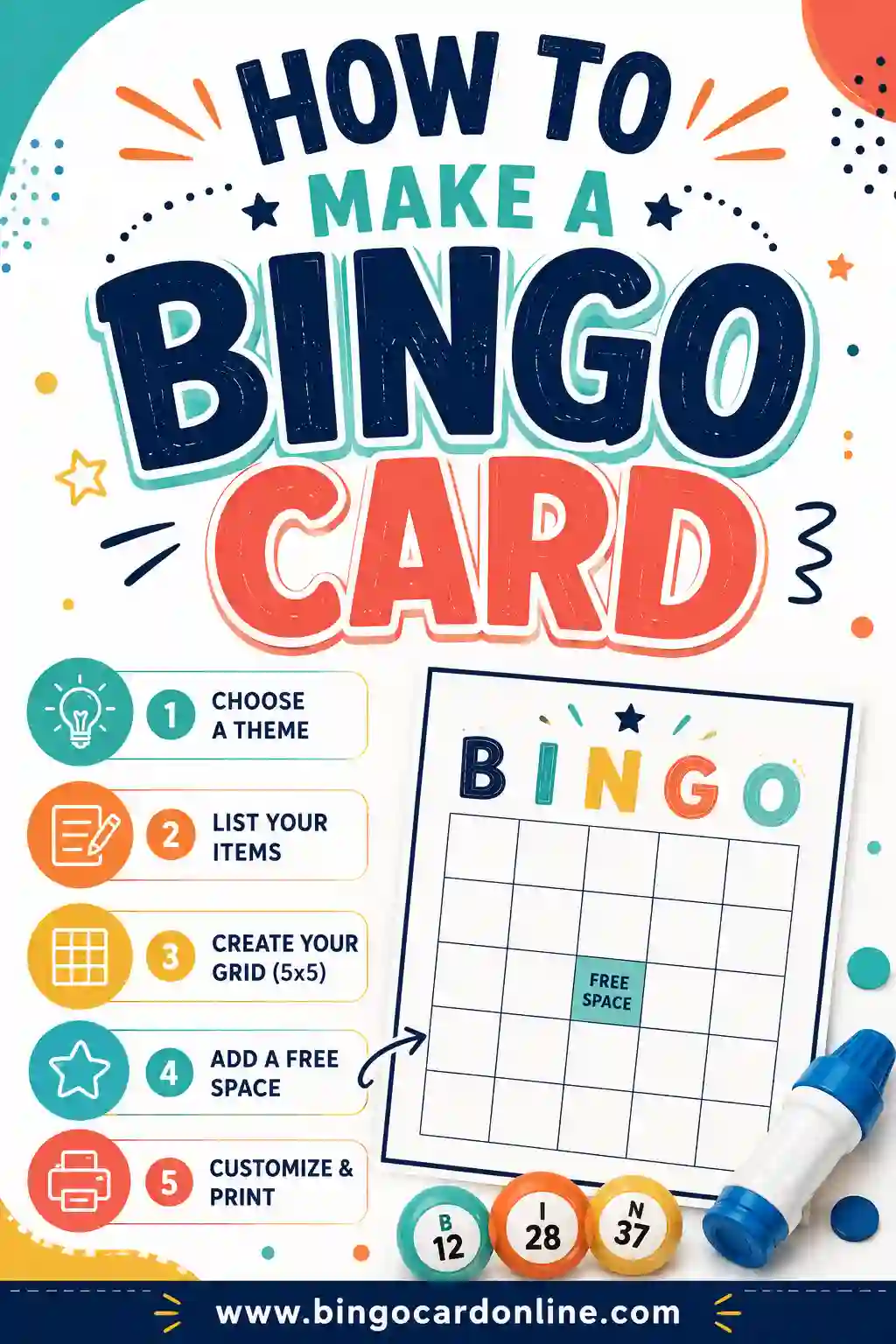
To make a bingo card, you draw a grid (usually 5x5), drop a different word, number, or picture into each square, and leave the center as a free space. Then you shuffle those same items into a fresh layout for every player so no two cards match. The fastest way to do it is a free bingo card generator that takes one word list and spits out a whole stack of unique, printable cards.
Want to skip the busywork? Open the free generator, paste in your list (there's a ready-made one below), pick how many cards you need, and print. No sign-up, no software, no design skills required.
What Goes On a Bingo Card
A bingo card is just a grid of squares. Each square holds one item: a number, a word, or a small picture. The classic version is a 5x5 grid with a free space in the middle, which gives you 24 filled squares plus that automatic center mark.
You're not stuck with numbers, though. People make bingo cards out of almost anything:
- Words for themed games (holidays, parties, classroom units)
- Numbers for the traditional 1-to-75 style
- Pictures for kids who can't read yet
- Phrases for "spot it" games, like movie bingo or road-trip bingo
The only real rule is that each square is different, and each card in your stack is laid out differently. That second part is what trips people up when they try to make cards by hand.
The One Thing That Makes Bingo Work
Here's the catch nobody mentions: every card needs a unique layout. If two players have the same arrangement, they'll both hit "Bingo!" at the exact same second, and the game falls flat.
That's why drawing cards by hand is such a pain. To make ten different cards, you'd have to reshuffle the same words ten times and copy them out square by square without making a mistake. It's slow, and it's easy to accidentally repeat a layout.
A generator solves this in one click. You give it a single word list, tell it how many cards you want, and it scrambles the words into a brand-new grid for each one. Ten cards, thirty cards, a hundred cards, all unique, all in a couple of seconds.
How to Make a Bingo Card in 5 Steps
You don't need to be crafty or tech-savvy. Here's the whole process from blank page to printed stack.
- Pick your grid size. 5x5 is standard. Go 4x4 for a quicker game, or 3x3 for little kids.
- Build your word list. You need at least one item per square. For a 5x5, that's 24 words minimum, but 30 or more is better (it makes the cards more varied).
- Drop in a free space. The center square is usually a freebie that every player gets for free. Some games skip it; that's your call.
- Make each card unique. Shuffle your list into a different layout for every player. This is the step a generator handles for you.
- Print and play. Print one card per player plus a few spares, hand out markers, and you're ready.
That's the entire thing. Most people go from "I need bingo cards" to a finished stack in under ten minutes.
Building a Good Word List
Your word list is the heart of the card. A strong list makes the game fun; a weak one makes it confusing. Here's a ready-to-use list of 30 general bingo squares you can copy straight into the generator.
| Easy & Common | Mid-Range | Fun Extras |
|---|---|---|
| Apple | Rainbow | Treasure |
| House | Bicycle | Lightning |
| Star | Umbrella | Volcano |
| Dog | Mountain | Robot |
| Tree | Anchor | Dragon |
| Flower | Compass | Rocket |
| Sun | Lantern | Castle |
| Fish | Feather | Comet |
| Boat | Mushroom | Skeleton |
| Heart | Snowflake | Telescope |
Mix and match across columns for variety. A few tips for picking words:
- Keep them concrete. "Apple" beats "happiness" because players can recognize it at a glance.
- Match your audience. Simple, picture-friendly words for kids; trickier ones for adults.
- Have extras. More words than squares means the generator can make every card feel distinct.
If you're building a themed game instead, swap this generic list for your topic. Holiday words, party moments, classroom vocabulary, song titles, whatever fits.
Picking the Right Grid Size
Bigger isn't always better. The grid you choose changes how long the game runs and who can keep up.
| Grid | Squares to fill | Best for |
|---|---|---|
| 3x3 | 8 (+ free space) | Toddlers and very short games |
| 4x4 | 15 (+ free space) | Kids and quick rounds |
| 5x5 | 24 (+ free space) | The classic, works for most groups |
A 5x5 is the default for a reason: it's long enough to build suspense without dragging. Drop to 4x4 when you want a faster game, or 3x3 when you're playing with preschoolers who'd get lost in a bigger grid.
Should you include a free space?
The center free space is a long-standing tradition, and it helps the game move faster since everyone starts with one square already marked. For a casual game, keep it. For a tougher challenge or a "spot it" game, you can drop it and make players earn every square.
Making Bingo Cards by Hand vs. Using a Generator
Both work. Here's the honest comparison so you can pick.
By hand is fine if you only need one or two cards, or you want a craft project with kids. Grab graph paper, draw a 5x5 grid, and fill it in. The downside: making many unique cards is tedious and error-prone.
A generator wins the moment you need more than a couple of cards. You enter your list once, and it produces a full set of unique cards instantly. You also get clean grids, consistent sizing, and a tidy printout. For a classroom, a party, or any group, it's the obvious choice.
A few things a good generator does for you automatically:
- Shuffles words into a different layout per card
- Adds the free center space
- Sizes squares evenly so the print looks neat
- Lets you pick 3x3, 4x4, or 5x5 without redrawing anything
How to Make Every Bingo Card Different
Unique cards are the single most important part of making bingo work, so it is worth knowing exactly how it is done — whether you use a generator or a pencil.
Why each card needs its own layout
If more than one person is playing. Two identical cards will always win on the same call, which means a tie every round. Even cards that share most of the same squares in the same spots cause near-ties and make the game feel predictable. The goal is a stack where every card has a different mix of items in different positions.
The shuffle method (by hand)
- Write every item on a slip of paper — use more items than squares (30+ for a 5x5).
- Put the slips in a bowl and draw them one at a time. Fill the card left to right, top to bottom, in the order you draw them. Skip the center if you are using a free space.
- Return all the slips, mix again, and repeat for the next card.
- Spot-check your stack. Lay finished cards side by side and make sure no two share the same row or column.
It works, but each card takes several minutes, and a big stack invites mistakes.
The generator method
A bingo card generator does the same shuffle automatically. Each card is a fresh random draw from your list, so every card gets a different selection of items and a different layout. With 30 or more items for a 5x5 grid, the number of possible cards is so large that duplicates are practically impossible, and the generator still checks the batch against itself. Bigger lists mean more variety: if you have 40 items and only 24 squares, each card leaves out a different 16, which makes wins less predictable.
Make Bingo Cards in Word, Google Docs, Canva or Excel
Already comfortable with an app you use every day? You can make a bingo card in most of them. Here is how the common options compare:
| Method | How you make the grid | Best for | Main drawback |
|---|---|---|---|
| Free online generator | Paste a list; the grid and shuffle are automatic | Any number of unique cards in minutes | Less freedom over custom artwork |
| Microsoft Word | Insert a 5x5 table and type into each cell | One or two cards with custom fonts | Every card must be shuffled and retyped by hand |
| Google Docs | Insert a 5x5 table, then make a copy of the doc per card | Sharing an editable card with a group | Same manual shuffling as Word |
| Canva | Start from a bingo card template and edit the text | A single, highly decorated design | Each unique card means editing another copy |
| Excel or Google Sheets | Format cells into a square grid; use random-number formulas to shuffle | Spreadsheet fans who want automation | Formulas take time to set up and print layout can be fiddly |
For step-by-step instructions, see our guides on how to make bingo cards in Word and how to make bingo cards in Excel. Google Docs works almost exactly like Word: choose Insert, then Table, pick a 5x5 grid, and drag the row heights until the squares look square.
The common thread: every app above can draw a grid, but only a generator shuffles the content into unique cards for you. A popular middle ground is to make your stack in the generator, then save it as a PDF and add any finishing touches afterward.
Bingo Cards With Pictures, Numbers or Letters
Words are the most common choice, but the same steps work for three other popular card types.
Picture bingo cards
Picture cards are ideal for toddlers, preschoolers, non-readers, and English learners. Pick simple, high-contrast images that cannot be confused with each other (a cat and a tiger look alike at small sizes), use a 3x3 or 4x4 grid, and show the matching picture when you call it. Our guide to making picture bingo for non-readers walks through it, and emoji bingo is a quick picture option that needs no image files.
Number bingo cards
Classic number cards follow fixed rules: in 1-75 bingo, the B column holds 1–15, I holds 16–30, N holds 31–45, G holds 46–60, and O holds 61–75. Making these by hand means drawing numbers from the right range for every column. A generator follows the column rules for you. See bingo cards with numbers for 1-75 and 1-90 cards, or number bingo 1-75 for the classic American game.
Letter and word-skill bingo cards
For early literacy, fill the squares with letters, letter sounds, or short words. Call a letter name or sound, and kids mark the match. It is easy to scale up from capital letters to lowercase to full words. Try alphabet bingo, phonics bingo, or sight word bingo for ready-made lists.
How to Make a Bingo Board for the Caller
People often say "bingo board" to mean two different things: the player's card, or the caller's master board that tracks what has been called. The cards are covered above; here is how to make the caller's board.
- List every item once. Use the exact same word list you used for the cards.
- Arrange it in a grid or column on a single sheet, in alphabetical order (or by number) so you can find items fast.
- Make call slips. Print a second copy of the list, cut it into slips, and put them in a bowl, bag, or hat.
- Mark as you go. Each time you draw a slip, cross that item off the master board. When someone calls bingo, check their marked squares against your board.
For a giant classroom display, draw the board on poster board or a whiteboard and cover each called item with a sticky note. For calling tips and pacing, see how to call a bingo game; if you want a blank grid to start from, try our blank bingo cards.
How to Make Bingo Cards for a Class
Bingo is one of the easiest ways to turn a review lesson into a game. Here is a simple plan teachers can reuse for any subject:
- Pick the answers, not the questions. Put the answers on the cards (vocabulary words, math results, dates, capitals) and call out the clues or questions. Students have to think before they mark.
- Write 30 or more answers so every student gets a different card.
- Generate one card per student plus a few spares, and print them a few to a page to save paper.
- Set the win: one line for a quick warm-up, blackout for a full review period.
- Make winners explain. Before a win counts, the student reads back each marked answer and its clue. That turns the win into a quick recap for the whole class.
Some lesson-ready ideas: vocabulary bingo, math bingo, multiplication bingo, and Spanish vocabulary bingo. For more classroom formats, see classroom bingo and bingo ideas for teachers.
Bingo Card Ideas to Get You Started
Not sure what to put on your cards? Pick a theme that fits your event, then build a 30-item list around it:
- Parties: baby shower, bridal shower, wedding, graduation, retirement party
- Holidays: Christmas, Halloween, Thanksgiving, Easter, Valentine's Day
- Travel and outdoors: road trip, car bingo, nature, travel
- Entertainment: movie night, trivia, Super Bowl
- Groups and work: team building, get to know you, senior and nursing home, church
Every one of these works with the same five steps: choose a grid, write the list, add a free space, shuffle into unique cards, and print.
Printing Tips for Cards That Last
Once your cards are made, a few small choices make them look sharp and survive game night.
- Use cardstock if you can. It holds up to repeated use and feels nicer than thin paper.
- Print a test card first. Check the margins so you don't end up with cut-off squares on a full stack.
- Black and white saves ink. The cards read clearly without color, and kids can color them in as a bonus.
- Laminate or use sleeves for reuse. Players mark with dry-erase markers, then you wipe the cards clean.
- Go bigger for little hands. A 3x3 or 4x4 grid leaves more room per square, which helps young kids.
What to use as markers
No special supplies needed. Any of these work:
- Dried beans, buttons, or coins
- Candy pieces (a hit with kids)
- A pen or crayon to cross squares off
- Bingo daubers, if you've got them
Common Mistakes to Avoid
A few easy slip-ups can flatten an otherwise fun game.
- Too few words. With exactly 24 words for a 5x5, every card ends up nearly identical. Aim for 30 or more.
- Identical layouts. If you reuse the same arrangement, multiple players win at once. Always vary the layout.
- Hard-to-read words. Abstract terms like "joy" are tough to spot. Stick to concrete things.
- One size for all. A 5x5 overwhelms toddlers. Run a smaller grid for the youngest players.
- No master list. As the caller, keep a record of what you've called so you can verify the winner.
Avoid those five, and your game will run smoothly from the first call to the final "Bingo!"
Frequently Asked Questions
How do I make a bingo card for free?
Use a free bingo card generator. Enter your word list, pick a grid size, choose how many cards you want, and print. There's no cost, no sign-up, and no software to install. You can also draw one by hand on graph paper if you only need a single card.
How many words do I need to make a bingo card?
For a 5x5 card you need at least 24 words (the center is a free space). For 4x4 you need 15, and for 3x3 you need 8. Always aim for a few more words than the minimum so each card in your stack comes out different.
What size should a bingo card be?
The classic bingo card is a 5x5 grid with a free center space. Use 4x4 for a faster game or 3x3 for young children. Print at standard letter size so the squares stay big enough to read and mark easily.
Can I make bingo cards with pictures instead of words?
Yes. Picture cards are perfect for kids who can't read yet. Use simple, recognizable images, one per square, and keep the grid small (3x3 or 4x4) so non-readers can follow along.
How do I make every bingo card different?
Shuffle your word list into a new layout for each card. A generator does this automatically: it rearranges the same words into a fresh grid for every player, so no two cards match. Doing it by hand is slow and easy to mess up.
Do bingo cards need a free space in the middle?
No, but it's a common tradition. The free center space speeds up the game since everyone starts with one square marked. For a tougher game, you can leave it out and make players fill every square.
How do I make bingo cards for a class?
Write 30 or more answers from your lesson, paste them into the generator, and print one unique card per student. Call out clues or questions instead of the answers so students have to think before they mark a square.
Can I make bingo cards with Canva?
Yes. Canva has bingo card templates you can edit, which is great for one beautifully designed card. To give every player a different card, though, you have to edit each copy by hand. Many people make their unique stack in a generator and save it as a PDF instead.
Can I make bingo cards in Google Docs?
Yes. Insert a 5x5 table, type one item into each cell, and adjust the row height so the squares look even. You will need to shuffle and retype the items for each player's card, which is why a generator is faster for more than a few cards.
How many bingo cards can I print?
As many as you need. The free generator makes each card a unique random draw from your list, so you can print a handful for family night or a full stack for a classroom or party. Print a few spares for latecomers.
How do I make a bingo board?
For players, a bingo board is just the card: a 5x5 grid with one item per square and a free center space. For the caller, make a master board listing every item once, then cross items off as you call them so you can verify winners.
Do all bingo cards need to be different?
Yes. If two players have the same card, they win on exactly the same call. Using more items than squares and shuffling each card separately (or letting a generator do it) keeps every card unique.
Ready to Make Your Bingo Cards?
Grab the word list above, open the free bingo card generator, and you'll have a stack of unique, printable cards in minutes. It's free, there's no sign-up, and every card comes out different. Once you've got the hang of it, try a themed set like birthday party bingo, music bingo, or baby shower bingo. Happy playing, and may the first "Bingo!" be yours.